
A full-size keyboard can crowd a desk fast, especially once you add a mouse, headset stand, monitor arm, or a second device. The Machenike KG98 tries to solve that problem without giving up the numeric keypad: it uses a 98-key compact layout, connects by wired USB-C, 2.4GHz wireless, or Bluetooth, and includes hot-swappable pre-lubed linear switches. For shoppers comparing mechanical keyboard gaming options, it is aimed at people who want a customizable board that can handle both play and everyday typing.
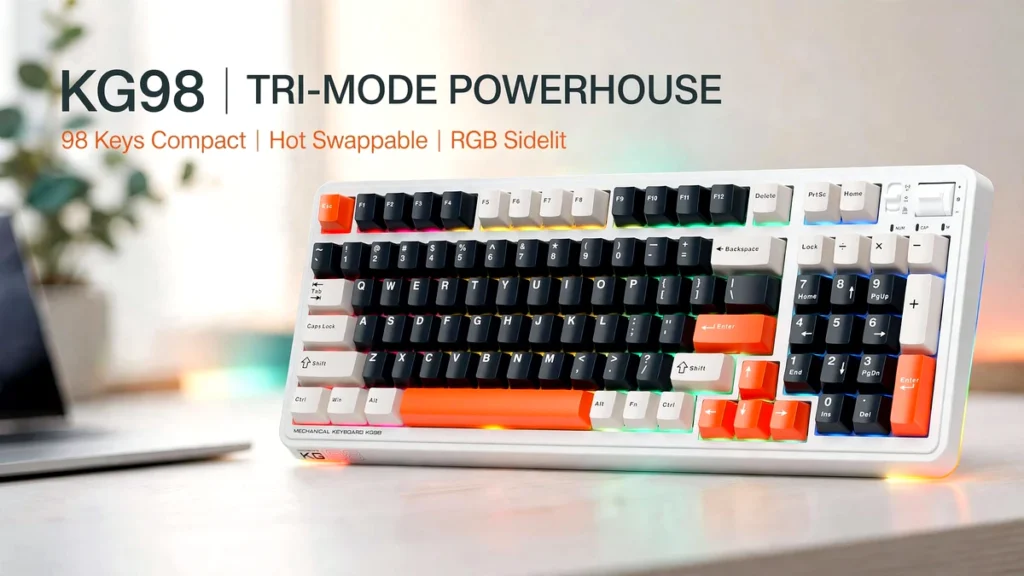
Product overview and buying context
Common problems and the product’s solution
Most people shopping for a mechanical keyboard run into one of three frustrations. First, tenkeyless boards save space but remove the number pad, which is annoying for spreadsheets, passwords, calculators, and data entry. Second, many budget mechanical keyboards feel fixed: if you dislike the switch feel later, your only real option is to replace the whole keyboard. Third, switching between a desktop, laptop, tablet, or phone often means juggling cables or buying separate peripherals.
The KG98 addresses those issues in a fairly direct way. Its 98-key layout keeps the number pad while trimming some of the unused space found on a traditional full-size board. Its hot-swappable switches are designed to be replaced without soldering, so the typing feel can change over time. And its three connection modes give it more flexibility around a mixed Windows, Mac, PC, and mobile setup.
That does not mean it eliminates every compromise. A 98-key board is still wider than a 75% or 65% keyboard, and wireless convenience depends on battery life, interference, and how often you remember to charge it. But for buyers who want a middle ground between full-size practicality and desk-friendly proportions, the format makes sense.
“This article may contain affiliate links to Amazon and AliExpress. If you purchase through one of these links, I may earn a commission at no extra cost to you.”
Product overview
The Machenike KG98 is a tri-mode mechanical keyboard with a 98-key compact layout, RGB backlighting, and pre-lubed linear switches. Machenike lists it for gaming, typing, and general computer use, with support for Windows and Mac systems. The company’s official product information identifies the KG98 as a 98-key wireless keyboard with wired, 2.4GHz, and Bluetooth connectivity, plus driver software support.
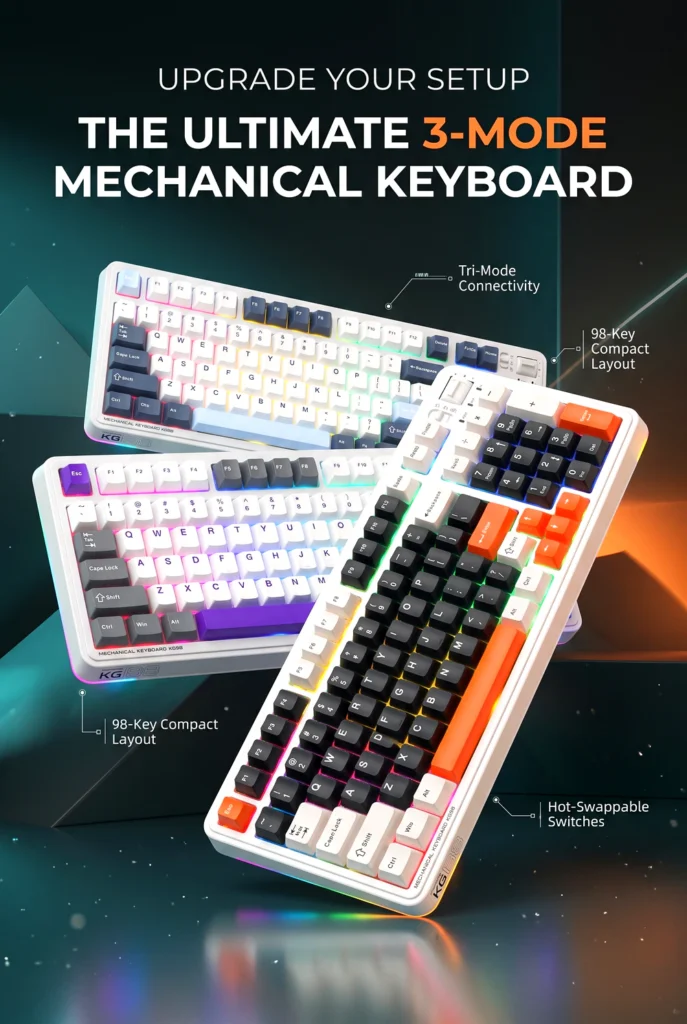


This is not a bare-bones office keyboard. The listing and supporting documentation describe a gasket-style internal structure, multiple layers of acoustic filling, a flex-cut PCB design, PBT keycaps, and an aluminum-alloy counterweight. Those details suggest that Machenike is trying to compete on typing feel and sound as well as basic functionality. Still, specifications alone cannot tell you how a particular unit will sound or feel on your desk, so it is sensible to treat those claims as design intent rather than a guarantee.
The KG98 appears best suited to someone who wants one keyboard for several jobs: gaming after work, typing documents, entering numbers, and occasionally connecting to another device. It may also appeal to buyers interested in custom gaming keyboard ideas, since hot-swap sockets and replaceable keycaps leave room to change the board’s feel and appearance later.
Key features that matter
Tri-mode connectivity
The KG98 supports USB-C wired mode, 2.4GHz wireless, and Bluetooth 5.0. In practical terms, that means you can use it like a conventional wired gaming keyboard, connect it through a USB dongle for lower-latency wireless use, or pair it with Bluetooth-compatible devices.
For a gaming-focused buyer, wired or 2.4GHz mode is likely the more relevant option. Bluetooth is convenient for tablets, phones, and secondary computers, but it is generally not the first choice for competitive play because wireless protocols and device environments can vary. The useful part is that you do not have to choose permanently: the same board can serve a desktop during the week and a tablet or laptop when needed.

One trade-off is setup complexity. Three connection modes mean a mode switch, pairing steps, and potentially a USB dongle to keep track of. None of that is unusual for a wireless mechanical keyboard, but buyers who want the simplest possible plug-and-play experience may prefer a wired-only model.
Hot-swappable switches
Hot-swappable sockets let you remove and replace switches without soldering. The KG98 ships with pre-lubed linear switches, and the product documentation says extra switches are included. Linear switches generally produce a smooth keystroke without the tactile bump found on tactile switches or the audible click of clicky switches.

Pre-lubing is intended to reduce friction and refine the sound and feel of each press. Factory lubrication can be useful for buyers who do not want to open switches and lube them manually. The caveat is that “pre-lubed” does not guarantee a particular sound profile; case design, keycaps, desk surface, and personal hearing all influence the result.
The bigger long-term benefit is flexibility. If you later decide you prefer a lighter linear, a heavier linear, or a tactile switch, compatible hot-swap switches can be installed without replacing the keyboard. That can make the KG98 more appealing than a soldered board for someone who wants to experiment. You should still confirm switch compatibility and pin configuration before buying aftermarket switches.
98-key compact layout
The 98-key layout includes the main typing area, function row, navigation keys, and a number pad, while removing some of the dead space associated with a conventional full-size keyboard. For many users, this is the most practical layout category: you retain spreadsheet-friendly number entry without committing to a wide board.

The listed dimensions are approximately 16.61 inches long by 7.48 inches wide by 2.16 inches high, with a listed weight of 3.52 pounds. Those figures matter if your desk is shallow or if you plan to travel with the keyboard. It is compact relative to many full-size boards, but it is not a small travel keyboard.
RGB and side lighting
The KG98 includes RGB backlighting with 16.8 million colors and adjustable lighting effects, along with dual-sided RGB light strips. The side lighting gives the board more visual presence than a keyboard with only under-key illumination.
That will appeal to gamers who like a more customized desk setup. It may be less appealing if you share an office, work in a dim room, or simply dislike glowing peripherals. The documentation indicates that lighting can be controlled through keyboard shortcuts and a multifunction toggle, and reducing brightness or turning lighting off can also help preserve battery life in wireless mode.
Multifunction toggle and software
A multifunction toggle on the top-right area provides quick access to volume, mute, and RGB lighting modes. That is a small feature, but it can be genuinely convenient when you want to lower game audio or change lighting without digging through menus.
Machenike also lists driver support for the KG98. Driver software can matter if you want to remap keys, adjust lighting, or create profiles, though the exact features available can depend on the operating system and software version. Before relying on advanced customization, check the current product page and manufacturer support resources for the latest driver compatibility.
Design, materials, and build
The KG98’s documented construction includes PBT keycaps, a gasket-mounted structure, five layers of acoustic filling, a flex-cut PC positioning plate, damping foam, and an aluminum-alloy counterweight. PBT keycaps are generally valued because they tend to resist shine from finger oils better than thinner ABS keycaps, though actual texture and longevity depend on the specific keycap quality.

The internal layout is more interesting than the exterior. Gasket designs and acoustic filling are commonly used to soften the typing experience and reduce hollow case noise. The aluminum counterweight may also help the keyboard feel more planted on a desk. These are reasonable design choices for a keyboard intended for both gaming and long typing sessions.
What cannot be judged from a specification sheet is fit and finish: keycap consistency, stabilizer rattle, case flex, switch wobble, and how well the board holds up after months of use. Those are the details that separate a good mechanical keyboard from a merely well-specced one, so it is worth reviewing current customer photos, questions, and feedback before ordering.
Real-world use
For a home gaming setup, the KG98’s biggest advantage is versatility. You can keep it wired for a desktop gaming PC, use the 2.4GHz dongle when you want fewer cables, and switch to Bluetooth for a laptop or tablet. The number pad makes it more useful for work tasks than a smaller gaming board.
In a small home office, the 98-key layout should be easier to position than a traditional full-size keyboard, but it still requires meaningful desk width. The listed weight suggests it is not especially travel-oriented. It could be moved between rooms, but it is better understood as a desk keyboard than an ultraportable accessory.
For shared use, the hot-swap design is helpful in a different way: one person can prefer the included linear switches while another can install a different compatible switch type. The RGB lighting may be divisive in a shared workspace, but it can be adjusted or turned down.
Buying decision
How it compares with typical alternatives
Compared with a basic wired mechanical keyboard, the KG98 offers more flexibility: three connection methods, hot-swap sockets, RGB side lighting, a number pad, and a more involved internal design. That flexibility is valuable if you expect to change devices or experiment with switches.
Compared with a premium custom keyboard, it is less of a blank canvas. Enthusiast boards often offer deeper case options, more refined stabilizers, wider switch compatibility, and extensive software control. The KG98 appears to bring several enthusiast-inspired features into a more accessible package, but buyers should not assume it matches a high-end custom build in every detail.
Compared with a compact 65% or 75% keyboard, it trades desk space for practicality. If you rarely use a number pad, a smaller layout may be more comfortable and leave more room for mouse movement. If you enter numbers regularly, the KG98’s retained numpad is a meaningful advantage.
Pros and cons
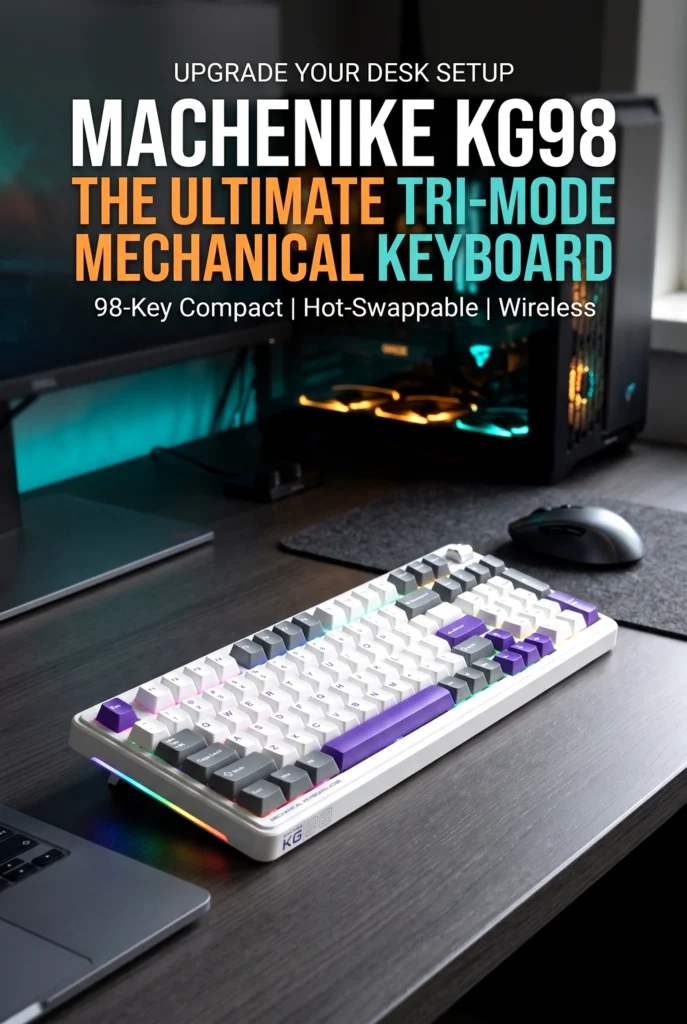
Potential advantages
- 98-key layout keeps a number pad while reducing full-size bulk.
- Tri-mode connectivity supports wired USB-C, 2.4GHz wireless, and Bluetooth 5.0.
- Hot-swappable sockets allow switch changes without soldering.
- Pre-lubed linear switches are intended to provide a smooth typing feel.
- RGB backlighting and side light strips offer visual customization.
- PBT keycaps, gasket-style construction, acoustic filling, and an aluminum counterweight are listed as part of the design.
- A multifunction toggle provides quick volume, mute, and lighting controls.
Potential limitations
- The 98-key format is still too wide for very small desks or minimalist travel setups.
- Linear switches will not suit buyers who want a tactile bump or audible click.
- Wireless battery life depends on lighting brightness, connection mode, and usage habits.
- Hot-swap does not automatically make every aftermarket switch compatible; pin layout and socket support should be confirmed.
- Long-term reliability, keycap finish, stabilizer performance, and real-world sound cannot be confirmed from specifications alone.
Who should buy it
The KG98 makes sense for a gamer or hybrid worker who wants one keyboard that can move between a PC, laptop, tablet, or phone. It is particularly sensible if you use a number pad often but do not want a conventional full-size board taking up the entire desk.
It may also suit someone entering the custom-keyboard hobby without wanting to solder. The included pre-lubed linear switches provide a starting point, while hot-swap sockets leave the door open to trying different switches later. Buyers who enjoy RGB lighting and want a keyboard with a more distinctive look may find the side lighting appealing.
Who may want something else
Competitive players who prioritize the smallest possible footprint and maximum mouse space may prefer a 60%, 65%, or 75% keyboard. Buyers who need tactile feedback for typing accuracy may want a tactile-switch model instead of a linear-switch keyboard. People who dislike RGB lighting, want an ultra-light travel board, or need a simple wired office keyboard may find this model more feature-rich than necessary.
Anyone buying primarily for a Mac should also verify the current listing’s macOS-specific key mappings and software support. The product is marketed for Windows and Mac use, but the practical experience can differ depending on the operating system and driver version.
Buying considerations
Before purchasing, measure the space where the keyboard will sit. The listed footprint is about 16.61 by 7.48 inches, so allow extra room for a mouse and comfortable wrist position. The listed weight of 3.52 pounds suggests a substantial board, which can help stability but makes frequent travel less convenient.
Check the exact switch variant offered in the listing, since documentation references multiple linear switch options across KG98 versions. Confirm whether the package includes the keycap puller, spare switches, USB-C cable, and 2.4GHz dongle, as bundled accessories can vary by seller or region.
Will it fit my setup?
It should fit most standard desks, but it is not a space-saving keyboard in the strictest sense. If your desk is shallow or you use a large mousepad with low sensitivity, measure first. The USB-C port, wireless dongle storage, and mode switch placement are also worth checking in product images if cable routing matters to you.
Is it suitable for frequent use?
The KG98’s gasket-style construction, PBT keycaps, and hot-swap sockets are features commonly associated with frequent typing and long-term customization. However, no specification sheet can prove how a keyboard will hold up after a year of heavy gaming or daily work. Treat the design as promising, but check recent customer feedback and the seller’s warranty terms before committing.
Is it worth the price?
The KG98’s value depends on how many of its features you will actually use. If you want wireless flexibility, a number pad, hot-swap capability, PBT keycaps, and RGB lighting in one board, the feature set is substantial. If you only need a basic wired keyboard for occasional gaming, a simpler model may cost less and do the job just as well.
Pricing, promotions, taxes, shipping, and availability can change, so compare the current listing price against simpler wired boards and other 98-key wireless models before deciding. The strongest value case is for a buyer who would otherwise purchase separate keyboards for gaming, work, and mobile use.
Final verdict
The Machenike KG98 is a thoughtfully specified 98-key mechanical keyboard for people who want practical full-size functionality without a conventional full-size footprint. Its tri-mode connectivity, hot-swappable pre-lubed linear switches, RGB side lighting, and enthusiast-leaning internal design give it more flexibility than a basic gaming keyboard.
Its main uncertainty is the usual one with feature-rich keyboards: real-world feel, sound, software behavior, and long-term durability depend on the specific unit and user expectations. Buyers who want a tactile or clicky typing experience, an ultra-compact layout, or a no-frills wired board should look elsewhere.
If your priority is a customizable mechanical keyboard gaming setup that still keeps a number pad for everyday work, the KG98 deserves a closer look. Check the current listing for the latest price, included accessories, switch variant, availability, and customer feedback before making a final decision.




The author of RigRamp.com has been managing and developing the website since 2015, with a strong background in online marketing and affiliate programs across various marketplaces. With a passion for technology, the author enjoys exploring the latest tech products, discovering useful digital tools, and following trends in the online industry.
