
Anker USB C hub review covering 4K HDMI, 85W Power Delivery, 5Gbps data ports, compatibility, pros, cons, and whether this hub fits your setup.
Introduction
Modern laptops are getting thinner, but their port selection isn’t always keeping up with the needs of everyday users. If your MacBook, Dell laptop, or other USB-C device lacks enough connections for an external display, USB accessories, and charging, a compact hub can make your workspace more practical.
The Anker USB C hub reviewed here combines five connection functions in one compact adapter, including HDMI output, USB-C data, two USB-A data ports, and USB-C Power Delivery passthrough. It’s designed for people who want to connect a monitor, use traditional USB accessories, and keep their laptop charged without carrying several separate adapters.
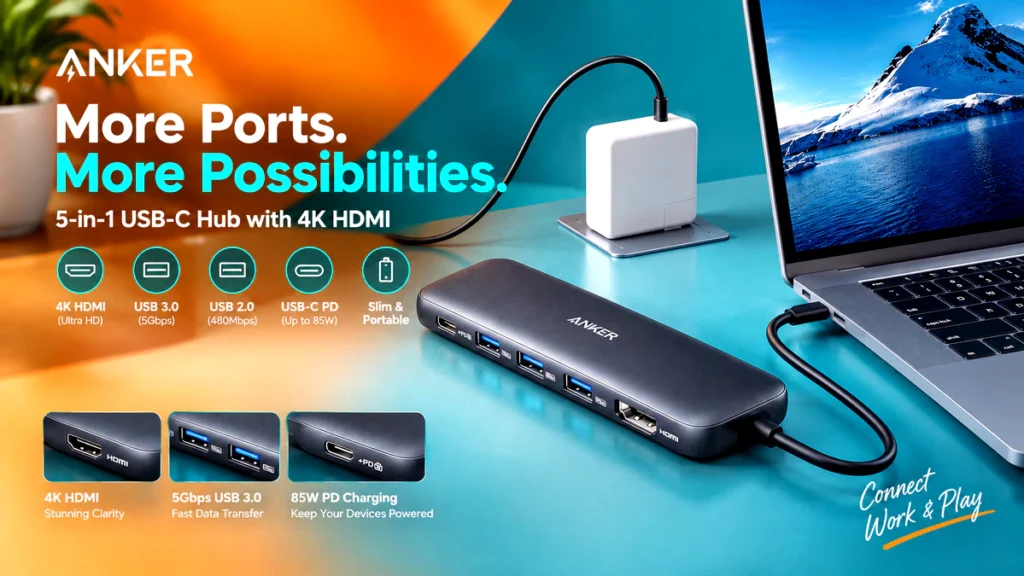


One important distinction: despite the common search term HDMI Splitter, this product is better understood as a USB-C multiport hub with HDMI output. An HDMI port allows a compatible laptop to connect to an external display, but it does not automatically mean the hub can split one HDMI signal across multiple independent monitors.
With 4K display support, data transfer speeds of up to 5Gbps on its designated data ports, and advertised power delivery of up to 85W, this Anker hub offers a useful combination of everyday connectivity features. The key question is whether its port selection and display capabilities match your particular laptop and workflow.
Affiliate Disclosure : As an Amazon Associate and AliExpress affiliate, I may earn from qualifying purchases made through links on this page.
Quick Verdict
The Anker 5-in-1 USB-C hub is worth considering if you need a straightforward way to add an external display, connect USB-A peripherals, and pass charging power through a single USB-C connection.
Its strongest selling points are its combination of HDMI output, three data ports, and power passthrough. That setup can be useful for office work, studying, presentations, and compact desktop workstations.

However, this is not a replacement for a full docking station. Users who need multiple monitor outputs, Ethernet, SD card readers, or a large number of peripheral connections may need a more comprehensive solution.
Bottom line: Consider this hub if your priority is practical, everyday connectivity rather than an extensive workstation expansion system.
Product Overview
The product is an Anker-branded, five-in-one USB-C hub in grey. Its listed configuration combines an HDMI display connection, one USB-C data port, two USB-A data ports, and a USB-C power input for charging passthrough.

Rather than replacing your laptop’s existing connections, it expands what you can connect through a compatible USB-C port.
For example, you could use the HDMI output for an external monitor, connect a USB mouse and keyboard through the USB-A ports, and connect a compatible charger to the power input. The USB-C data port provides another option for supported data accessories.
The practical appeal is simplicity: fewer separate adapters and a more organized desk setup.
Key Specifications & Features
The following specifications reflect the product’s stated configuration. Actual performance depends on the host laptop, connected accessories, charger, cables, and display.
| Feature | Listed specification |
|---|---|
| Product type | 5-in-1 USB-C hub |
| Color | Grey |
| Display output | HDMI with advertised 4K support |
| Power Delivery | Up to 85W maximum |
| USB-C data | One port, up to 5Gbps |
| USB-A data | Two ports, up to 5Gbps |
| Primary connection | USB-C |
| Intended devices | Compatible MacBook, Dell, and other USB-C laptops |
4K HDMI Display Output
The HDMI connection allows you to connect a compatible laptop to an external monitor or television. This can make working with spreadsheets, documents, browser windows, and presentations more convenient.
The product is advertised as supporting 4K display output. However, the exact supported refresh rate and operating conditions should be confirmed before purchase, especially if you intend to use a high-refresh-rate monitor or rely on specific display settings.
Your laptop’s USB-C port must also support the required video output functionality. A USB-C connector alone does not guarantee that a device can send video to an external display.
Up to 85W Power Delivery
The USB-C Power Delivery input is intended to let you charge a compatible laptop while using the hub’s other connections.
The advertised 85W maximum is useful to consider when matching the hub with your laptop’s charging requirements. However, 85W is a maximum specification, not a guarantee that every laptop will receive that amount.
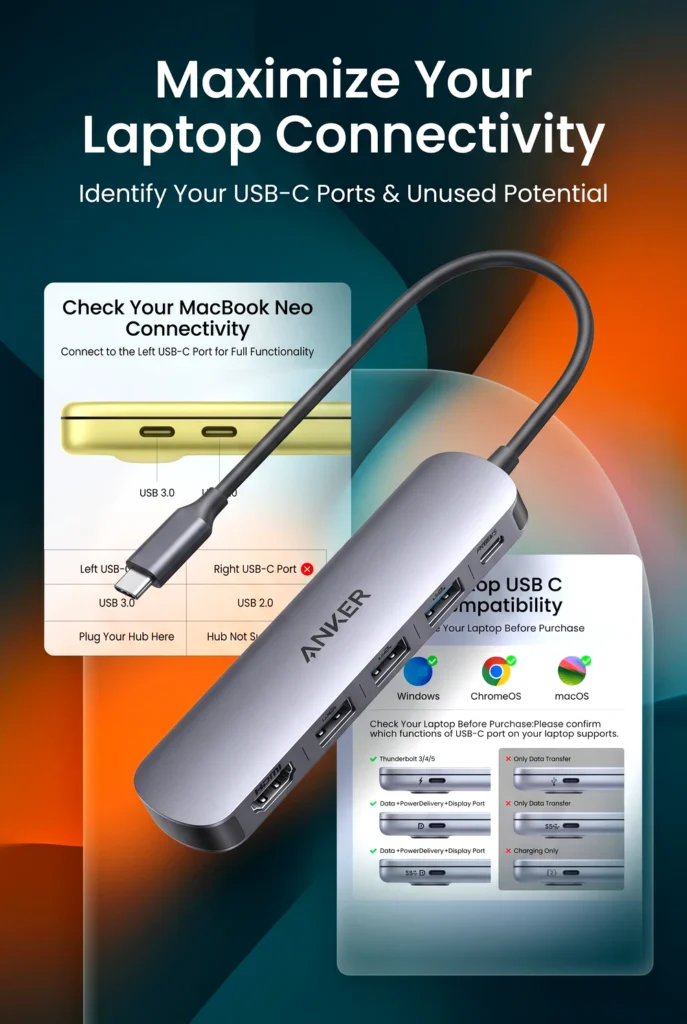
Actual charging power depends on the connected charger, the laptop’s supported charging profile, and the hub’s power allocation. The hub should not be assumed to include a wall charger unless the current package details explicitly say so.
Three 5Gbps Data Ports
The hub includes one USB-C data port and two USB-A 3.0 data ports, each listed with speeds of up to 5Gbps.
The two USB-A connections are useful for traditional peripherals such as a mouse, keyboard, USB flash drive, or compatible external storage device. The USB-C data port offers another connection for supported accessories.
The 5Gbps figure represents the stated interface speed, not a guaranteed real-world file transfer rate. Actual transfers can be slower depending on the storage device, file sizes, connection conditions, and shared bandwidth.
Also, the USB-C data port should not be confused with the separate power input. Its listed purpose is data connectivity, and its inclusion does not establish that it can charge another laptop or drive an additional monitor.
Design & Build Quality
The grey finish gives the Anker USB-C hub a neutral appearance that should fit naturally into most laptop setups. Its multiport design is intended to consolidate several connections into a single accessory rather than require separate adapters for each task.
For mobile professionals and students, this type of hub can help reduce the number of small accessories carried between home, the office, and class.
However, appearance alone doesn’t establish long-term durability. The exact enclosure material, cable construction, resistance to wear, and performance under sustained workloads should not be assumed without verified details.
Before buying, check the product’s current specifications and package contents to confirm the physical configuration suits your setup.
Practical Use & Performance
For Home Offices and Productivity
This hub makes the most sense in a simple productivity setup. You can connect a compatible external monitor through HDMI, attach a mouse and keyboard through USB-A, and use the power input for laptop charging.
That arrangement can reduce the need to reconnect several accessories whenever you move your laptop between work locations.
For Students and Everyday Computing
Students who use a compatible laptop for research, writing, online classes, and presentations may appreciate having display output and familiar USB connections in one accessory.
It can also be useful when a classroom projector or presentation display requires HDMI, provided the laptop supports video output through USB-C.
For Travel and Flexible Workspaces
A multiport hub can be more convenient than carrying several individual adapters. It is particularly useful for people who alternate between a home desk, shared workspace, and meeting room.
Its suitability for travel will depend on its actual dimensions, weight, and cable arrangement, which should be checked if portability is a deciding factor.
For External Displays and Accessories
The hub’s advertised 4K HDMI support and 5Gbps data connections cover common everyday needs. Nevertheless, display output and peripheral performance depend on the host device and connected equipment.
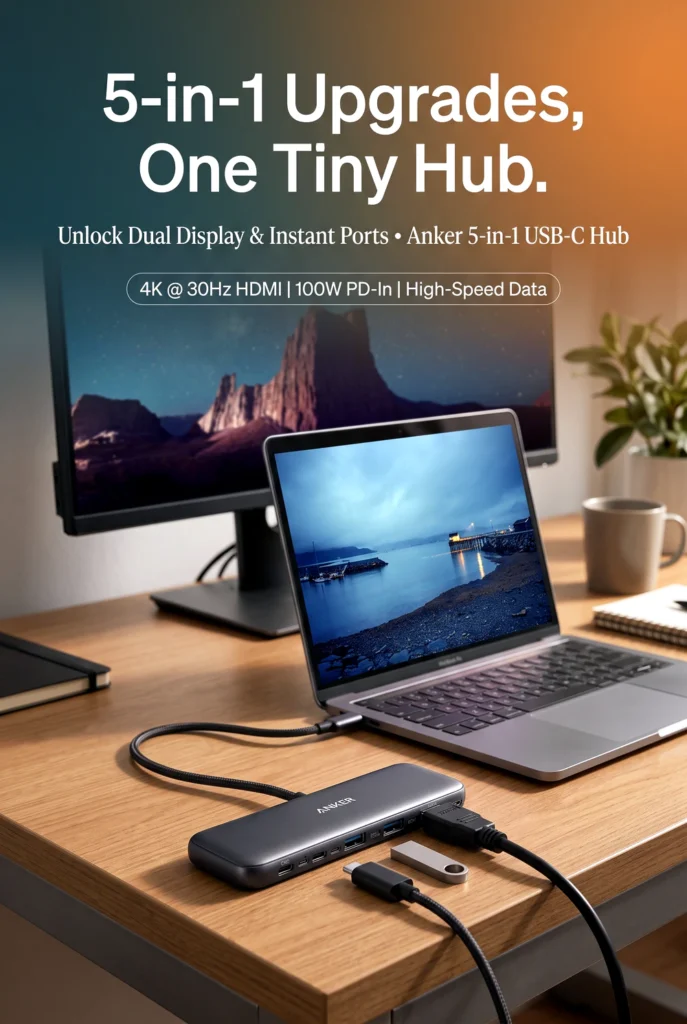
If you need two independent external monitors, a dedicated HDMI splitter, multiple video outputs, or a docking station with additional features, verify those requirements carefully. This five-in-one configuration does not establish support for every advanced display arrangement.
Benefits & Potential Drawbacks
The Anker hub’s main advantage is its combination of display output, data connectivity, and charging passthrough. Whether that combination is enough depends on how many devices you use and what you expect from a USB-C adapter.
Key Benefits
- Multiple connections in one accessory: HDMI, USB-C data, and two USB-A data ports cover several common laptop connectivity needs.
- External display support: The advertised 4K HDMI output is useful for compatible monitors and presentation displays.
- Charging passthrough: Up to 85W of advertised Power Delivery can help keep a compatible laptop powered while connected to accessories.
- Familiar USB-A ports: You can continue using compatible older peripherals without needing a separate USB-C adapter for each one.
- Flexible everyday use: The configuration suits many home-office, study, and travel scenarios.
Potential Drawbacks
- Limited expansion: Five functions may be enough for basic productivity but insufficient for a workstation with many peripherals.
- No confirmed multi-monitor expansion: The listed configuration doesn’t establish support for multiple independent external displays.
- Charging depends on your setup: The 85W maximum does not guarantee that every laptop will charge at its full required rate.
- Performance varies: Actual display behavior and data transfer speeds depend on the laptop and connected devices.
- Some details require confirmation: The exact HDMI refresh rate, physical dimensions, included accessories, and other unverified specifications should be checked before ordering.
Customer Feedback
Customer feedback could not be independently assessed for this specific product variant. Therefore, this review does not assign a customer rating, cite a review count, or claim that buyers consistently report particular experiences.
Before purchasing, look for recent reviews that identify the exact model and discuss real-world display compatibility, charging behavior, connection stability, and performance with your particular laptop family.
Pay particular attention to reviews from users with the same laptop model and monitor resolution. Feedback about a different Anker hub or a similar-looking adapter may not apply to this five-in-one configuration.
Pros & Cons
| Pros | Cons |
|---|---|
| HDMI output with advertised 4K support | Limited to the listed five-function configuration |
| Up to 85W Power Delivery | Actual charging power varies by setup |
| One USB-C and two USB-A data ports | No Ethernet or card reader listed |
| Up to 5Gbps data speeds on all three data ports | Maximum interface speed isn’t guaranteed in practice |
| Useful for common office and study tasks | Advanced multi-monitor needs may require another solution |
Who Should Buy It?
A Good Fit For
MacBook and compatible laptop users: If your laptop has limited ports and supports video output through USB-C, this hub can provide a convenient way to connect a display and common peripherals.
Home-office workers: The combination of HDMI, USB-A, USB-C data, and charging passthrough is useful for everyday productivity without requiring a larger docking station.
Students and remote workers: If you regularly connect a mouse, keyboard, flash drive, or external display, the hub offers a practical way to consolidate those connections.
People who want fewer adapters: The five-in-one format may be appealing if you prefer one accessory over several separate dongles.
Who May Want to Skip It?
Users with demanding multi-monitor setups: If your workflow requires two or more independent external displays, look for a docking station with explicitly documented support for your laptop and monitor configuration.
Photographers and content creators who need card readers: No SD or microSD card reader is listed in this configuration, so you’ll need a separate reader or a different hub.
Users who require wired networking: Ethernet is not among the listed connections. Choose a model with a dedicated Ethernet port if wired network access is essential.
Owners of laptops with different charging or video requirements: Confirm USB-C video output support, required charging wattage, and operating-system compatibility before buying. Don’t assume every USB-C-equipped device supports every hub function.
Final Verdict
The Anker USB C hub is a practical option for users who need a handful of essential connections without moving to a larger docking station. Its combination of advertised 4K HDMI output, up to 85W Power Delivery, one 5Gbps USB-C data port, and two 5Gbps USB-A data ports addresses several common laptop connectivity problems.

Its value depends on whether those five functions match your daily workflow. For basic office work, studying, presentations, and connecting traditional USB accessories, the configuration looks useful on paper. For advanced display setups, wired networking, memory-card access, or extensive peripheral expansion, a more fully equipped hub may be a better fit.
It’s also worth remembering that an HDMI Splitter and a USB-C hub with HDMI output serve different purposes. If you want to duplicate one HDMI signal across multiple displays, check the exact functionality of the device you need rather than assuming this hub provides that feature.
Overall, this Anker hub deserves consideration if your priority is straightforward connectivity in a compact, five-function format. Confirming your laptop’s video-output support, charging needs, and required ports will help you decide whether it’s the right accessory for your setup.
Check the Latest Price and Availability
If this hub matches your connectivity needs, check the current product listing before making a decision. Review the latest price, availability, supported display specifications, charging requirements, package contents, and recent customer reviews.
Taking a moment to confirm compatibility with your exact laptop model can help you avoid buying an adapter that doesn’t support your intended setup.




The author of RigRamp.com has been managing and developing the website since 2015, with a strong background in online marketing and affiliate programs across various marketplaces. With a passion for technology, the author enjoys exploring the latest tech products, discovering useful digital tools, and following trends in the online industry.
