
A basic laptop screen can make a long workday feel cramped fast—especially when you are bouncing between a spreadsheet, browser tabs, a CRM, and video calls. The Samsung 27-inch Essential S3 S36GD is built for the person who wants a larger, more comfortable single-screen workspace without turning a desk into a complicated multi-monitor project.
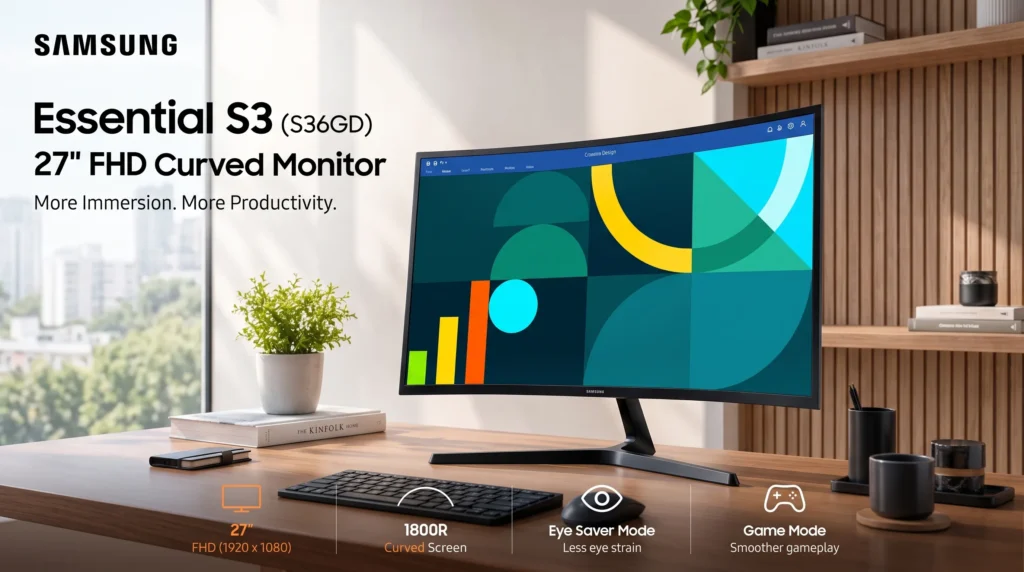
This is not a high-resolution creative monitor or a serious competitive-gaming display. It is a straightforward 27-inch Full HD curved monitor with a 100Hz refresh rate, 1800R curve, HDMI and VGA connectivity, and eye-comfort features. For remote work, schoolwork, casual entertainment, older PCs, and relaxed gaming, it has a practical mix of features—provided you are comfortable with 1080p resolution on a fairly large 27-inch panel.samsung+2
The problems this monitor addresses
A lot of shoppers looking into a curve monitor setup are not chasing an elaborate battlestation. They are trying to fix a few ordinary frustrations: limited laptop workspace, visual fatigue during long sessions, and a desk that needs to accommodate both newer and older devices.
A laptop display is too small for daily multitasking
A 27-inch screen gives you substantially more physical workspace than a laptop panel. The Samsung’s active display area is about 23.5 inches wide by 13.2 inches high, which is enough room to keep a document open beside email, a web browser, or a smaller communication window without everything feeling squeezed.samsung.
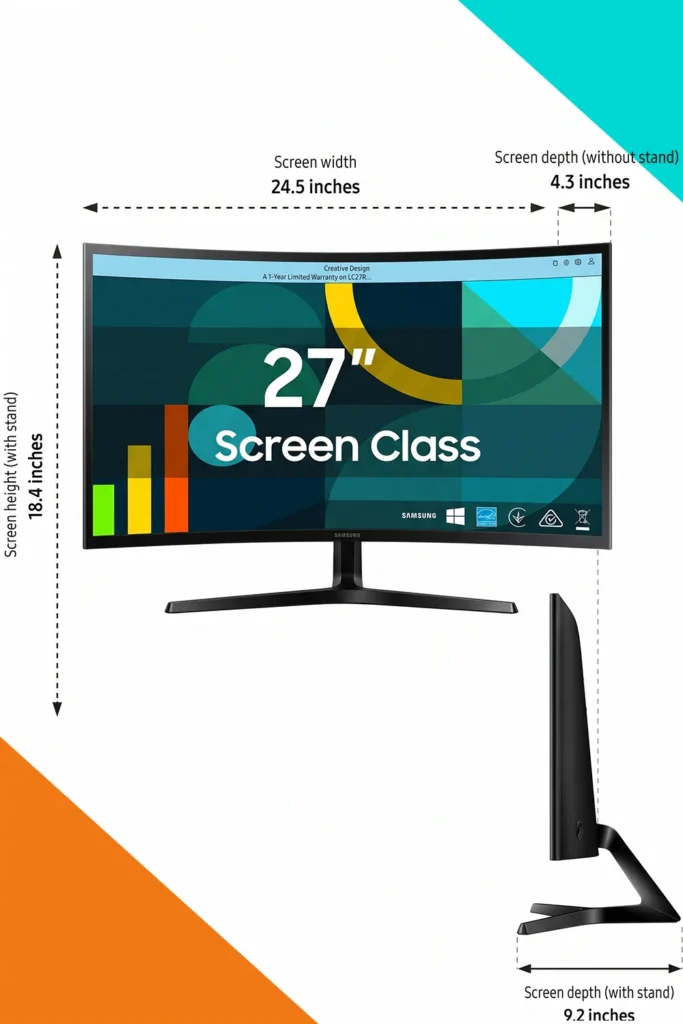
The 16:9 format is conventional rather than ultrawide, and that is a good thing for many desks. You get a larger, more immersive workspace without the width and placement demands of a 34-inch ultrawide monitor. Its overall footprint with the stand is listed at roughly 24.5 inches wide, 9.2 inches deep, and 18.4 inches high. That makes it realistic for a standard home-office desk, apartment workstation, or dorm room.
Flat screens can feel less focused at close desk distance
The 1800R curve is moderate. In plain language, the left and right edges of the panel bend gently toward you rather than sitting in one flat plane. Samsung positions that curve as a way to bring more of the screen into your field of view and reduce peripheral distraction.samsung+1
For a single-monitor desk, this makes the most sense when you sit centered in front of the screen. The curve is not dramatic enough to transform ordinary work, but it can make a 27-inch display feel more cohesive when you are reading, watching video, or moving between windows. It is also a better fit for one primary user than a shared screen viewed from different angles around a room.
New and older computers may need different connections
Many inexpensive modern monitors offer HDMI only. This Samsung model includes HDMI and D-sub/VGA connectivity, which is useful if you are connecting an older desktop computer, a legacy office system, or hardware that still relies on VGA. Product listings for the U.S. model also indicate a headphone output, although buyers should confirm the exact package and regional specifications before ordering.microcenter+2
That port mix will not suit everyone. There is no DisplayPort, USB-C input, or built-in USB hub listed for this model. If your goal is one-cable laptop charging and display output, this is not the monitor to buy. But for HDMI laptops, desktop PCs, game consoles, and older VGA-equipped systems, the connection options are more flexible than the most stripped-down budget displays.
What the Samsung Essential S3 actually is
The Samsung Essential S3 S36GD is a 27-inch curved VA monitor with a 1,920-by-1,080 Full HD resolution, 16:9 aspect ratio, 1800R curvature, and a maximum 100Hz refresh rate. It uses a VA panel, which is typically chosen for stronger contrast than many entry-level IPS displays; Samsung lists a typical brightness of 250 cd/m², while third-party product listings cite a 3,000:1 static contrast ratio and a 4ms response time.


In practical terms, it is intended as an affordable everyday display—not a monitor designed around pixel-dense text, professional color work, USB-C convenience, or high-frame-rate esports. The priorities here are screen size, gentle curvature, smoother-than-60Hz motion, and compatibility with common devices.
That distinction matters. A 27-inch FHD panel can be perfectly usable for normal office tasks at a sensible viewing distance, but it will not make text as crisp as a 27-inch QHD monitor. If you spend all day editing small type, reviewing detailed financial sheets, designing for print, or working with high-resolution photos, the resolution tradeoff deserves serious consideration.
Features that matter in a curve monitor setup
27-inch FHD screen
The screen is large enough to make a laptop feel secondary rather than central. You can place the laptop off to the side, use the Samsung as the main screen, and still retain a manageable desk footprint.
The limitation is pixel density. Full HD spread over 27 inches means a lower pixel density than Full HD on a 24-inch monitor or QHD on a 27-inch monitor. Text and fine interface details may look less sharp if you sit very close. For buyers who prefer larger on-screen elements—or who sit around arm’s length away—that may be an acceptable tradeoff. For detail-heavy office work, a higher-resolution option may be worth the added cost.
1800R curved panel
An 1800R curve is designed around close, centered use. It is most helpful for someone setting up one main monitor for office work, casual games, streaming, or browsing. It gives the display a slightly more enveloping feel without requiring the desk depth or wide visual sweep associated with an ultrawide monitor.samsung+1
There is a practical downside: curves are personal. Some users prefer a flat panel for precise visual alignment, shared viewing, photo editing, or layouts where straight lines need to be judged carefully. The curve does not make the monitor inherently better; it makes it better suited to a certain viewing position.
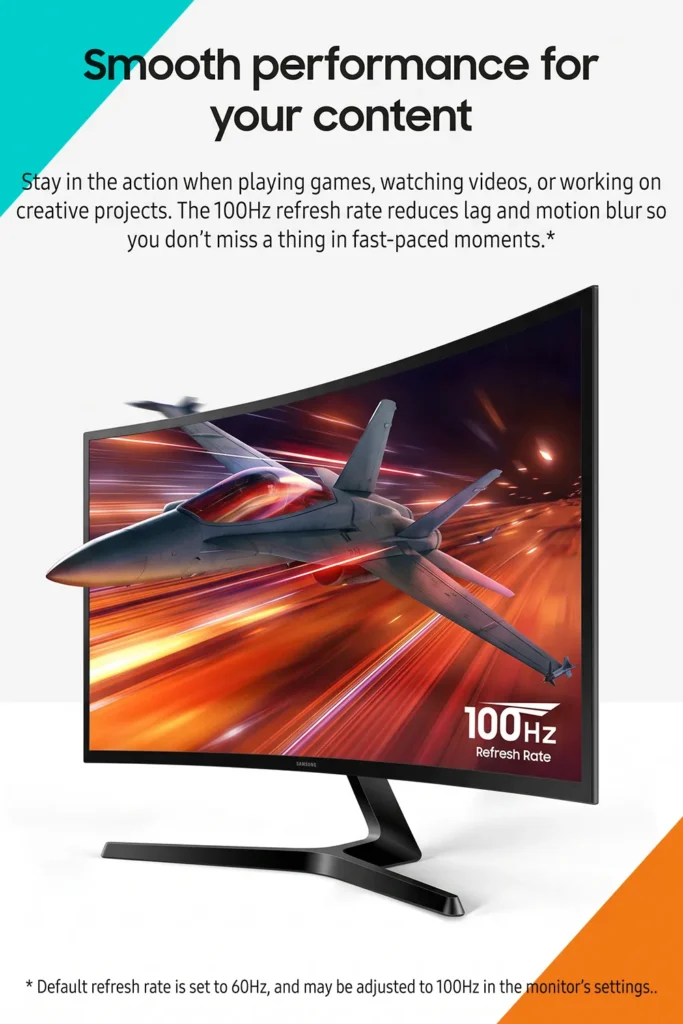
100Hz refresh rate
Moving from 60Hz to 100Hz can make routine motion look noticeably smoother. Mouse movement, scrolling through long pages, window dragging, video playback, and casual gaming can feel more fluid, assuming the computer is set to use the 100Hz mode. Samsung lists the monitor’s maximum refresh rate at 100Hz.samsung+1
This is a meaningful improvement over many older office monitors, but it is not a replacement for a 144Hz, 165Hz, or 240Hz gaming display. Fast competitive players should also remember that smoothness depends on the game, system hardware, connection type, and settings—not just the monitor’s advertised refresh rate.
Game Mode
Samsung includes a Game Mode intended to optimize display settings for gaming. It may be handy for casual players who want a quick preset rather than adjusting picture controls manually.
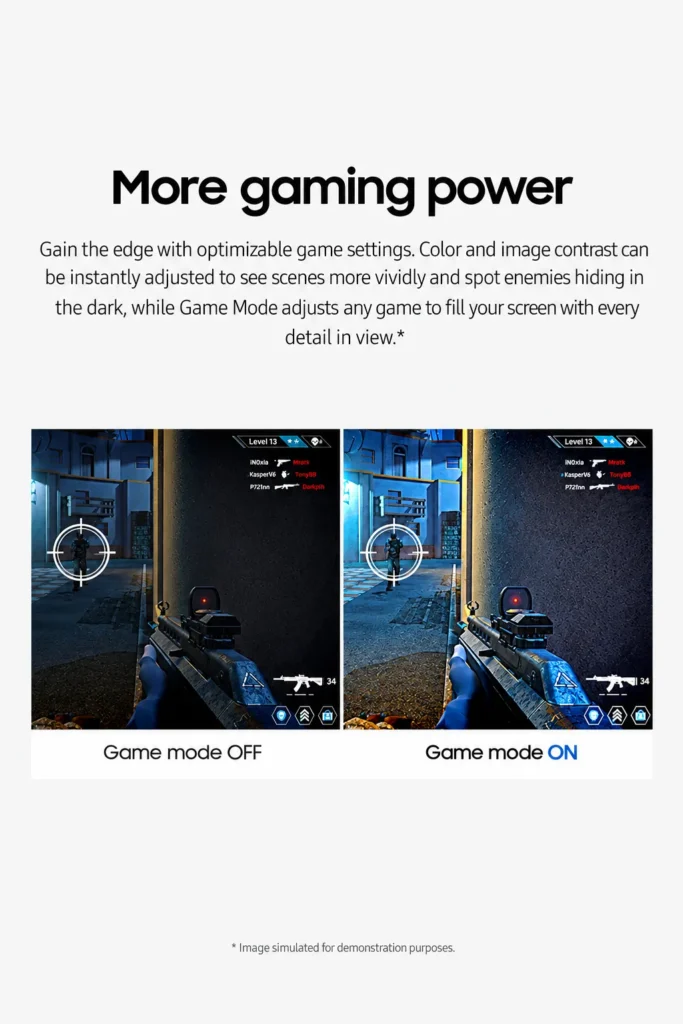
Still, the monitor’s underlying specifications define its ceiling. With a 100Hz maximum refresh rate and 4ms response time listed by retailers, it looks better matched to single-player titles, strategy games, racing games, console use, and casual multiplayer than to buyers who prioritize elite-level motion clarity.target+1
Advanced Eye Comfort features
Samsung markets Advanced Eye Comfort for reduced viewing strain, and listings describe blue-light reduction and flicker-reduction features. These can be useful during long reading, spreadsheet, study, or browsing sessions, particularly in the evening.

Eye-comfort modes are not a cure for poor ergonomics. You will still benefit from placing the top of the screen near eye level, setting brightness to suit the room, taking periodic breaks, and avoiding a viewing distance that feels uncomfortably close.
HDMI and D-sub ports
The HDMI port covers the connection most current laptops, desktops, streaming devices, and consoles use. The D-sub/VGA port adds backward compatibility for older equipment. That is a practical pairing for a home office where not every device is brand-new.microcenter+1
The omission of USB-C is the important catch. A modern USB-C laptop may require a USB-C-to-HDMI adapter or dock, and the monitor is not listed as supplying power delivery. Check your laptop’s video-output capability before purchase, especially if it has only USB-C ports.
Stand and mounting flexibility
The stand is listed with tilt adjustment from -2° to 22°, which is helpful for getting the viewing angle right on a standard desk. The monitor is also listed as VESA 75 x 75 compatible, so a compatible monitor arm or wall mount can be an option if you need more height adjustment or want to reclaim desk space.
Because the included stand does not appear to offer height, swivel, or pivot adjustment in the published specifications, a monitor arm may be the smarter solution for taller users, shallow desks, or ergonomic setups.
Real-world use: where it fits best
For a home-office setup, the Samsung curve monitor works best as a simple primary display. A sales professional, student, or remote worker could keep a CRM or spreadsheet on the main screen while using a laptop for chat, notes, or video controls. The extra display area is the main upgrade; the curve and 100Hz refresh rate make that experience feel a little more pleasant rather than merely bigger.
In a smaller room, its approximately 9.2-inch stand depth is worth checking against the desk. The monitor is not especially heavy—published listings place it around 8.4 pounds with the stand—but it still needs a stable surface and enough room to sit at a comfortable distance.hsdsonline+1
For entertainment, the VA panel’s listed 3,000:1 contrast ratio may appeal to viewers who prefer deeper dark scenes than many basic IPS office panels can produce. On the other hand, the 250-nit typical brightness suggests this is better suited to normal indoor lighting than a very bright sun-filled room.samsung+1
For gaming, it is an approachable step up from 60Hz. The 100Hz refresh rate and Game Mode are sensible for relaxed play, but this is not the model to choose solely for competitive shooters or demanding, high-frame-rate PC gaming.
How it compares with typical alternatives
| Type of monitor | Where the Samsung S3 has an advantage | When the alternative may be better |
|---|---|---|
| Basic 24-inch 1080p flat monitor | Larger workspace, a more immersive 1800R viewing shape, and a 100Hz maximum refresh rate | A 24-inch FHD screen usually delivers sharper-looking text because the same pixels are packed into a smaller area |
| Typical 27-inch 60Hz office monitor | Smoother scrolling and motion up to 100Hz, plus curved viewing | A flat office display may be preferable for shared viewing or buyers who simply dislike curved panels |
| 27-inch QHD monitor | Likely lower-cost, simpler everyday feature mix, and potentially useful VGA support | QHD offers much sharper text and more workspace, especially for dense documents and productivity tasks |
| USB-C productivity monitor | HDMI and VGA support older equipment without requiring specialized cables | USB-C models are better for modern laptops that need charging, video, and peripherals through one cable |
| High-refresh gaming monitor | A more restrained, multipurpose specification for work, casual entertainment, and moderate gaming | Dedicated gaming monitors offer faster refresh rates, often better motion performance, and more gamer-focused features |
The Samsung curve monitor occupies a middle ground. It is more engaging than an entry-level 60Hz office display, but it does not try to compete with higher-resolution productivity monitors or specialized gaming models. That can be an advantage when you want a straightforward display rather than a feature-heavy one.
Pros and cons
Pros
-
27-inch screen provides a meaningful workspace upgrade over most laptops
-
1800R curve suits centered, single-user desk setups
-
100Hz maximum refresh rate should feel smoother than a standard 60Hz panel
-
HDMI and VGA/D-sub support both current and legacy devices
-
Game Mode and eye-comfort features add practical everyday flexibility
-
Listed VESA 75 x 75 support gives you an upgrade path to a monitor arm
-
Compact enough for many standard desks, at about 24.5 inches widehsdsonline+1
Cons
-
Full HD at 27 inches is less crisp than QHD at the same size
-
No listed USB-C, DisplayPort, or USB hub
-
250-nit typical brightness may be modest for very bright rooms
-
Stand adjustment appears limited mainly to tilt
-
100Hz is smoother than 60Hz, but modest beside dedicated high-refresh gaming monitors
-
The curved screen is best for one person sitting centered, not broad off-angle viewing
Who should buy it
The Samsung Essential S3 S36GD makes the most sense for buyers who want a clean, uncomplicated Samsung curve monitor for a home office, study area, or mixed work-and-entertainment desk.
It is a particularly reasonable choice if you:
-
Are upgrading from a laptop screen or older 60Hz monitor
-
Want a 27-inch display but do not need QHD resolution
-
Use HDMI now but appreciate VGA compatibility for an older PC
-
Prefer a centered, single-monitor curve monitor setup
-
Play casual games and want motion that feels smoother than 60Hz
-
Need VESA mounting as a possible future option
Who should look elsewhere
A different type of monitor will make more sense if you need crisp text at close range, extensive multitasking space, or modern single-cable laptop docking.
Look toward a 27-inch QHD monitor if your work involves detailed spreadsheets, programming, writing, image editing, or long hours of small text. Consider USB-C models if you use a newer laptop and want charging, display output, and peripheral connectivity through one cable. And choose a 144Hz-or-higher gaming monitor if competitive speed is the priority.
Buying considerations before ordering
Measure your desk before buying. The monitor is roughly 24.5 inches wide and 9.2 inches deep with its stand, so leave enough room for a keyboard, mouse, and comfortable viewing distance.
Also verify your computer’s ports. HDMI is easy for most modern systems, but a USB-C-only laptop may need an adapter or compatible dock. VGA support can be helpful for older hardware, although VGA is an analog connection and will not be the best choice when HDMI is available.
Finally, be clear about resolution expectations. The 27-inch size is appealing, but Full HD is its largest compromise. If large screen real estate, a gentle curve, and lower system demands matter more than razor-sharp detail, the tradeoff is reasonable. If text precision is your top concern, pay more for QHD.
Is it worth the price?
Without tying the review to a temporary Amazon price, the value proposition is straightforward: you are getting a 27-inch curved VA monitor with FHD resolution, a 100Hz maximum refresh rate, basic eye-comfort features, Game Mode, HDMI, VGA, and VESA compatibility.samsung+2
That package can be worthwhile if it is priced appropriately below more capable 27-inch QHD or USB-C productivity monitors. The purchase becomes less compelling if its price gets too close to those higher-resolution options, because the biggest limitation—1080p resolution at 27 inches—does not disappear.
Amazon pricing and availability can change, so compare the current listing against similarly sized QHD and USB-C models before checking out.
Final verdict
The Samsung 27-inch Essential S3 S36GD looks like a practical curved monitor for people who want a larger, smoother everyday screen without paying for features they will not use. Its strongest points are the 27-inch 1800R panel, 100Hz refresh rate, and useful HDMI-plus-VGA connectivity. Its biggest compromise is clear: Full HD on a 27-inch display will not satisfy shoppers who prioritize sharp text and dense desktop space.

If your main problem is making laptop work, browsing, casual gaming, and streaming feel less cramped, this is why I like this one: it keeps the curve monitor setup simple. Check the current Amazon listing if the screen size, resolution, and connection options match the devices and desk you already have.

The author of RigRamp.com has been managing and developing the website since 2015, with a strong background in online marketing and affiliate programs across various marketplaces. With a passion for technology, the author enjoys exploring the latest tech products, discovering useful digital tools, and following trends in the online industry.
