
You buy a slim laptop because it’s light and quiet, then realize it has two ports and you need five. Plug in the charger and one port is gone. Add a monitor and another disappears. Now you can’t read the SD card from your camera without unplugging something. That’s the problem a USB-C hub multiport adapter is built to fix, and the UGREEN USB C hub Revodok 7-in-1 is a budget-friendly attempt at it.


A quick note on research: I could not open the Amazon listing directly, so I pieced this together from the listing title, the manufacturer’s product information for this hub, and retailer pages. I haven’t tested or owned this hub, so nothing here comes from hands-on use. Where details conflict or can’t be confirmed, I say so.
Disclosure: This article may contain Amazon & Aliexpress affiliate links. As an AliExpress and Amazon Associate I earn from qualifying purchases, at no extra cost to you.
The problems this hub may solve
Not enough ports. The listing describes seven connections: one HDMI output, one 100W USB-C charging port, one USB-C data port, two USB-A data ports, and separate SD and TF (microSD) card slots. For someone with a thin laptop or an iPad Pro, that adds up to a real upgrade from two ports. The catch is that the hub itself takes up one of your laptop’s USB-C ports.
Charging while you work. The 100W Power Delivery port lets you keep your laptop plugged into its charger while the hub is connected. Based on how pass-through charging works, you still need your own USB-C charger, and the hub can’t make a weak charger stronger. Buyers with a 100W laptop charger should confirm how much power actually reaches the laptop, since hubs commonly keep a small share for themselves.
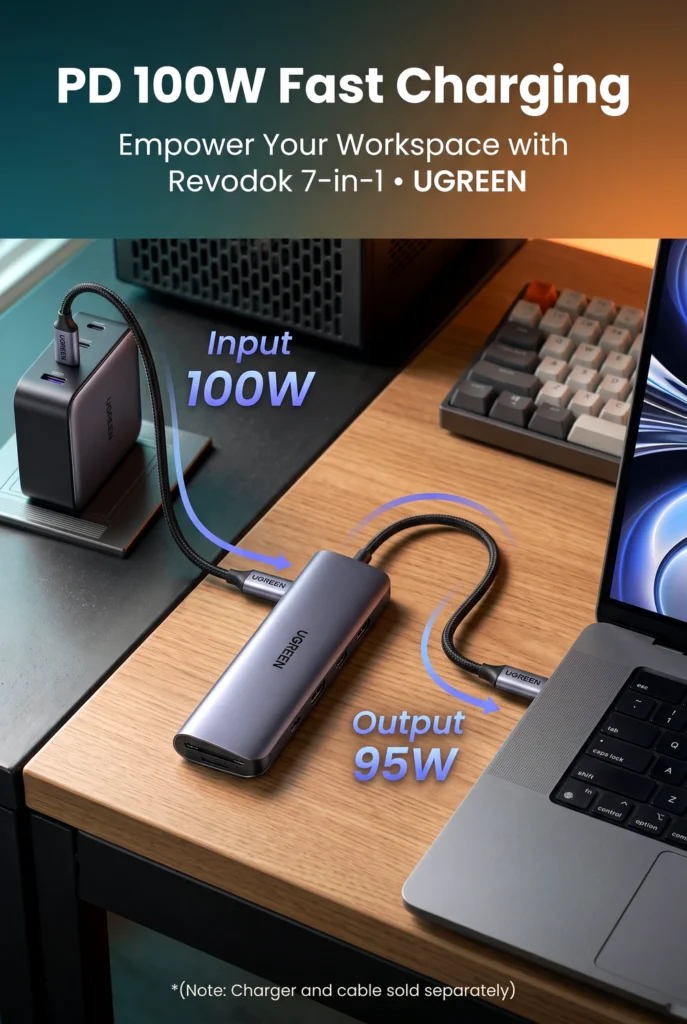
Photo and video files. The built-in SD and TF readers suit photographers, drone owners, and anyone who regularly moves footage off a camera. Not needing a separate card reader is a small convenience, but a real one.
Presentations and a second screen. The HDMI port is the feature most people will care about. It supports 4K output, which makes a monitor, TV, or projector easy to connect. More on the refresh rate below, because it matters.
Flash drives, mice, and external storage. Two USB-A ports and one USB-C data port, all listed at 5Gbps, cover the usual accessories without a pile of adapters.
What this product is
This is a compact, multi-port USB-C adapter that connects to a laptop or tablet and adds ports the device lacks. It’s aimed at people with MacBook Pro or Air models, iPad Pro, Dell XPS, and Lenovo ThinkPad laptops, all of which appear in the listing title. The manufacturer’s information also mentions Surface devices and other USB-C laptops and tablets. It’s a portable, everyday hub rather than a full desktop docking station.
The features that matter most
HDMI output. This is what lets you extend or mirror your screen. The listing says 4K, but the refresh rate is where buyers get tripped up. The manufacturer’s information for this hub indicates 4K at 30Hz, not 60Hz. That’s fine for spreadsheets, documents, and presentations, but a 30Hz picture can feel sluggish for mouse movement and fast-moving video. Some other UGREEN hubs with similar names advertise 4K at 60Hz, so be careful not to mix them up. If smooth 4K matters to you, confirm the refresh rate on the listing before ordering.

100W Power Delivery. This keeps your laptop topped up while the hub is in use. It helps anyone who works plugged in for long stretches. The limitation is that you need to supply a capable charger, and your laptop’s own charging needs decide whether 100W is relevant to you.
5Gbps data ports. The two USB-A ports and the USB-C data port are listed at 5Gbps, which is suited to flash drives, mice, keyboards, and many portable drives. Buyers who move very large files regularly, or use fast external SSDs, may find 5Gbps limiting compared with 10Gbps hubs.
SD and TF card readers. These are useful for cameras and drones. I couldn’t verify real-world read speeds or whether both slots work at the same time, so photographers with heavy workloads should check the listing’s details.
What’s missing. This model does not appear to include an Ethernet port. Some other UGREEN 7-in-1 hubs do, so if a wired connection matters for video calls or large downloads, read the port list carefully.
Questions buyers should ask before ordering
Will it work with my laptop? If your laptop’s USB-C port supports video output, it should. The listing names MacBook Pro and Air, iPad Pro, XPS, and ThinkPad models. Some USB-C ports only handle data and charging, so check your device’s specifications.
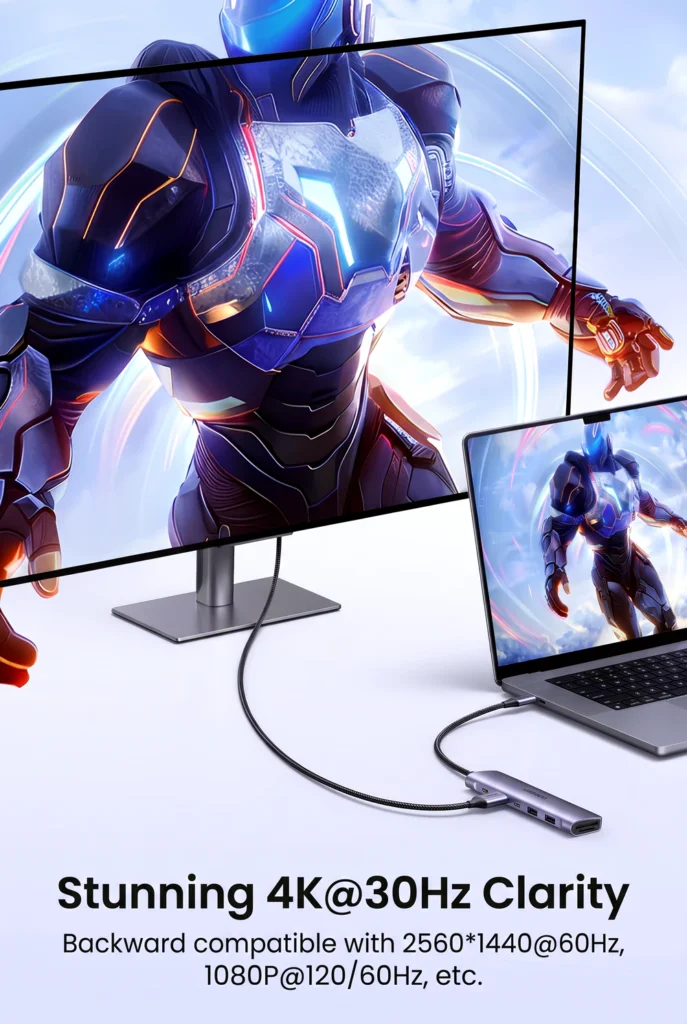
Is it really 4K? Yes for resolution, but confirm the refresh rate, as explained above.
Can I charge and use everything at once? In principle, yes, with your own charger connected. Whether full 100W reaches your laptop is something I could not verify.
Do I need drivers? I could not confirm this on the listing. Hubs like this are generally plug-and-play, but check the product page for your operating system.
Will it block the neighboring port? I could not verify the exact size or cable length from what I could access. Buyers with crowded laptop edges should check the dimensions.
Does it get warm? Hubs that handle charging and video output can get warm under load. I have no data on this model’s thermal behavior, so I can’t say how it performs over time.
How long will it last? There’s no way to judge long-term durability from the product information, so I won’t guess.
Where this fits in the category
Seven ports in a small body at a budget price is the main appeal. Based on the listed specifications, the strengths are the port mix (especially the SD and TF readers plus a USB-C data port) and the 100W pass-through charging. The trade-offs are the 4K refresh rate, the 5Gbps ceiling, and the apparent lack of Ethernet. Pricier hubs and true docks may offer 4K at 60Hz, faster data ports, dual displays, or wired networking. I don’t have reliable comparison data to say how this hub stacks up against any specific competing brand, so I won’t claim it beats one.
Is it good value?

Based on what I could find, this hub has been sold at a fairly low price. I saw a sale price in the mid-teens in dollars on a deal-tracking page in March 2026, but I can’t confirm what it costs today. Prices and availability change often, so check the current listing. For someone who needs a few extra ports, 100W charging, and a basic external display, that kind of price points to solid value. For someone who needs 60Hz 4K, faster storage speeds, or a wired network connection, the savings may not be worth the compromises.
Pros and cons
Pros:
- Seven listed connections in a compact format
- 100W Power Delivery pass-through charging
- HDMI port with 4K output
- Separate SD and TF card slots
- USB-C data port plus two USB-A ports
- Listed compatibility with popular MacBook, iPad Pro, Dell, and ThinkPad models
Cons:
- 4K appears limited to 30Hz on this model
- 5Gbps data ports, not 10Gbps
- No Ethernet port appears in the listed ports
- Needs your own charger for pass-through power
- Real-world charging, speed, and heat performance can’t be verified from the listing
Who should buy it, and who should look elsewhere
This hub suits students, remote workers, and travelers with a thin laptop or iPad Pro who need a monitor connection for presentations or documents, a card reader, and a few USB ports. It also suits people who want an affordable way to keep their laptop charging while using several accessories.

Consider something else if you play games or edit video on an external 4K screen and want 60Hz, if you rely on wired internet, or if you transfer large files to fast external drives. A hub with Ethernet, faster ports, or a full dock may suit you better.
Before buying, check three things: that your laptop’s USB-C port supports video output, the HDMI refresh rate on the current listing, and whether your charger is strong enough for pass-through charging.
Final verdict
The UGREEN USB C hub does its best work as an affordable, compact USB-C hub multiport adapter that turns a port-starved laptop into something usable, with charging, a monitor connection, card readers, and USB ports in one device. The most important trade-off is the 4K refresh rate, which appears capped at 30Hz, along with the absence of Ethernet. It’s a good fit for everyday office, study, and travel use. People who want smooth 4K, fast storage, or wired networking should skip it. For the right buyer, the feature set looks like good value at a low price, though I’d confirm the current price and specifications first.

If a thin laptop’s port shortage is slowing you down and a 30Hz 4K display is fine for your work, the UGREEN Revodok 7-in-1 hub is worth a look on Amazon.



The author of RigRamp.com has been managing and developing the website since 2015, with a strong background in online marketing and affiliate programs across various marketplaces. With a passion for technology, the author enjoys exploring the latest tech products, discovering useful digital tools, and following trends in the online industry.
