
Explore the MUSETEX Y6 ATX Mid Tower Case with four pre-installed non-LED fans, Type-C connectivity, and 270° tempered glass.
Affiliate Disclosure
Disclosure: As an Amazon Associate and AliExpress affiliate, I may earn from qualifying purchases made through links on this page.
Introduction
A PC case does more than hold your components. It affects your build’s appearance, airflow potential, cable management, and everyday convenience. The MUSETEX Y6 PC Case aims to bring several desirable features together, including a panoramic glass design, four pre-installed non-LED fans, and modern front-panel connectivity.

For builders looking for an ATX Mid Tower Case with a showcase-style appearance, the Y6 is worth considering. Its 270° full-view tempered glass design is intended to make the internal components more visible, while the included fans offer a starting point for a cooling setup without requiring an entirely separate fan purchase.
Another notable feature is its Type-C connection, which makes this Computer Case with Type-C appealing to users who want convenient access to compatible modern peripherals.
However, a case’s appearance and advertised features only tell part of the story. Component clearance, radiator support, fan placement, dust filtration, and cable-routing space can make a meaningful difference when assembling a PC.
This review examines the MUSETEX Y6’s stated features, practical advantages, potential limitations, and the buyers who should consider it before committing to a new build.
Quick Verdict
The MUSETEX Y6 is worth investigating if you want a black ATX mid-tower case with panoramic tempered glass, four pre-installed non-RGB fans, and Type-C connectivity.
Its most obvious appeal is the combination of a showcase-oriented design and a straightforward, understated cooling setup. The lack of built-in fan lighting may also suit builders who prefer a clean appearance over a colorful RGB presentation.
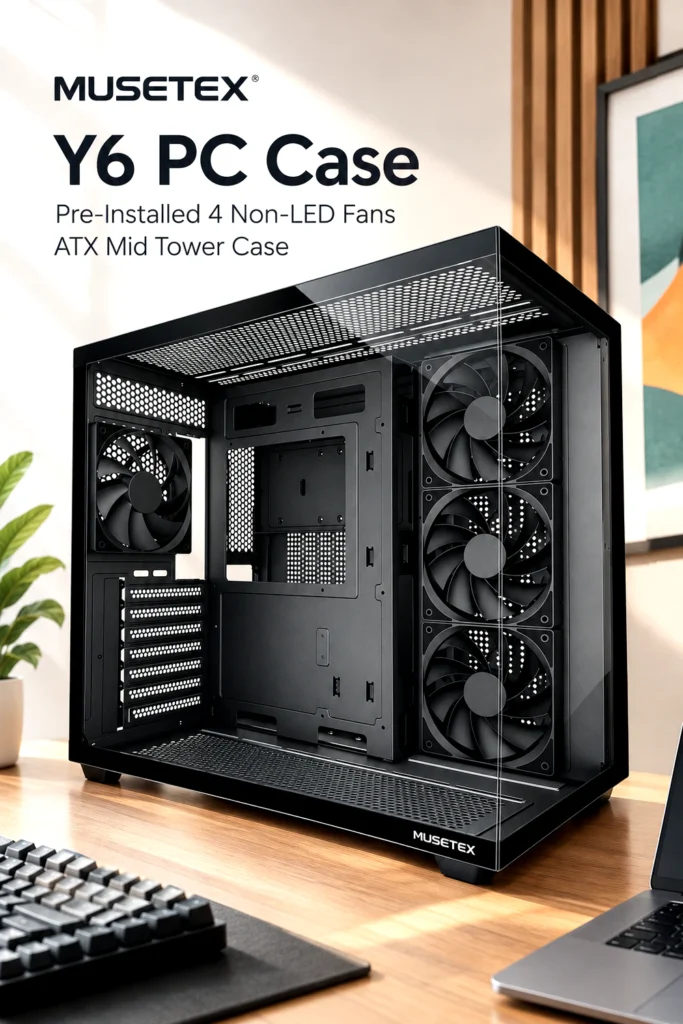


The main consideration is compatibility. Before buying, verify the case’s exact motherboard support, graphics card clearance, CPU cooler height, storage options, and cooling-system compatibility against your planned components.
Bottom line: The MUSETEX Y6 looks promising on paper for a clean, glass-focused PC build, but its overall value depends on verified compatibility, cooling details, build quality, and current pricing.
Product Overview
The MUSETEX Y6 is a black ATX mid-tower computer case designed to house a desktop PC while showcasing its internal hardware through a 270° full-view tempered glass layout.
Its listed features include four pre-installed non-LED fans and a Type-C port. Together, these features target builders who want a visually appealing system without necessarily adding illuminated fans or purchasing every cooling component separately.
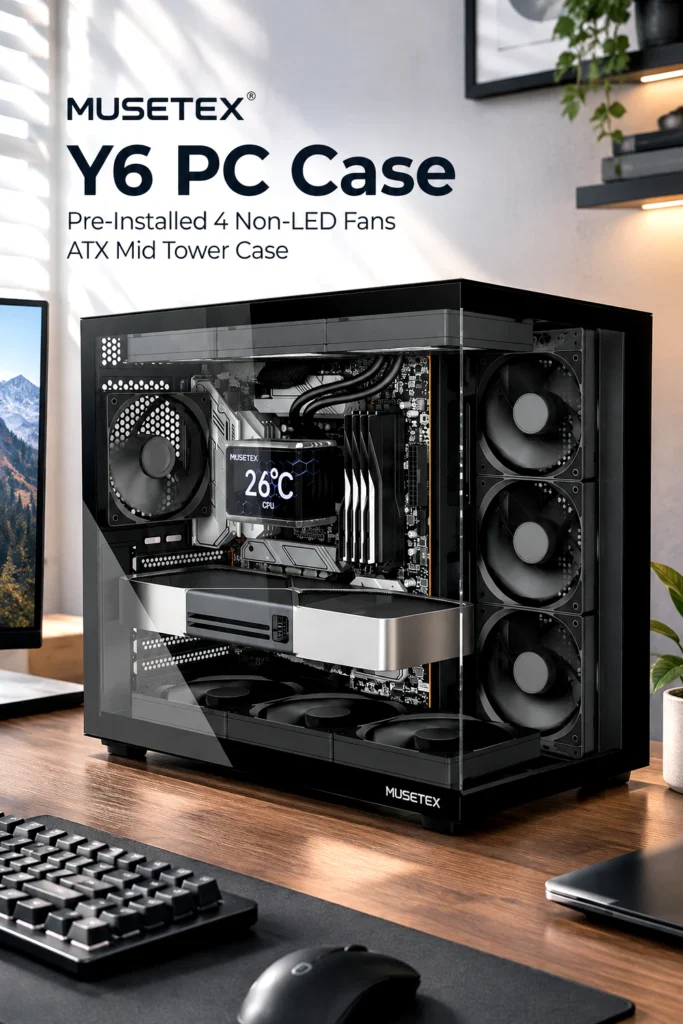
Unlike a conventional enclosed case with a more limited window, a panoramic glass layout places greater emphasis on the appearance of the motherboard, graphics card, cooling hardware, and cable routing. That makes component arrangement particularly important.
The Y6 may appeal to gaming PC builders, home desktop users, and enthusiasts putting together a clean-looking workstation. However, the exact level of compatibility and expandability should be confirmed before selecting it for a demanding or component-heavy build.
Key Specifications & Features
The following table separates the product’s stated features from details that still need verification.
| Feature | Listed specification |
|---|---|
| Brand | MUSETEX |
| Model | Y6 |
| Case type | ATX mid tower |
| Color | Black |
| Pre-installed fans | Four |
| Fan lighting | Non-LED |
| Glass design | 270° full-view tempered glass |
| Front-panel connectivity | Type-C |
| Exact motherboard dimensions supported | Verify before purchase |
| Maximum GPU length | Not independently verified |
| Maximum CPU cooler height | Not independently verified |
| Radiator compatibility | Not independently verified |
| Dust filters and storage capacity | Not independently verified |
1. Four Pre-Installed Non-LED Fans
Four included fans give builders a starting point for case ventilation without requiring them to purchase a complete set immediately.
The non-LED design is particularly relevant if you prefer a subdued setup. It can complement a black motherboard, a dark graphics card, and other components with little or no lighting.
Keep in mind that the number of included fans does not automatically establish cooling performance. Fan size, placement, speed, airflow direction, case ventilation, and component heat output all matter.
Check the manufacturer’s fan specifications and installation layout to understand how the supplied configuration is intended to work.
2. 270° Full-View Tempered Glass
The panoramic glass design is one of the Y6’s defining features. It provides a broader view of the internal hardware than a small side window typically offers.
This can make a carefully assembled gaming PC look more cohesive, particularly when the motherboard, GPU, and cable routing are coordinated.
Tempered glass can also make fingerprints and dust more noticeable, so regular cleaning may be necessary. Handle glass panels carefully during installation or maintenance, and confirm how they are removed and secured before purchasing.
3. Type-C Connectivity
A Type-C port is a useful addition for people who regularly connect modern accessories, storage devices, or compatible peripherals.
However, the presence of a Type-C connector does not establish its data-transfer speed, charging capability, or display functionality. Those capabilities depend on the case’s actual port specifications and the motherboard connection used to support it.
If Type-C connectivity is important to your setup, verify the port’s supported standard and the motherboard header required to connect it.
4. Black ATX Mid-Tower Format
A black mid-tower case offers a familiar starting point for a wide range of desktop builds. Its understated color can work with gaming components, productivity hardware, and more traditional desktop setups.
Nevertheless, the ATX mid-tower designation alone does not guarantee compatibility with every ATX motherboard, large graphics card, oversized air cooler, or liquid-cooling radiator. Always check the precise dimensions and supported hardware before ordering.
Design & Build Quality
The MUSETEX Y6’s design prioritizes visibility. Its black finish and panoramic glass panels are suited to builders who want their hardware to be part of the room’s visual setup rather than hidden beneath a solid exterior.
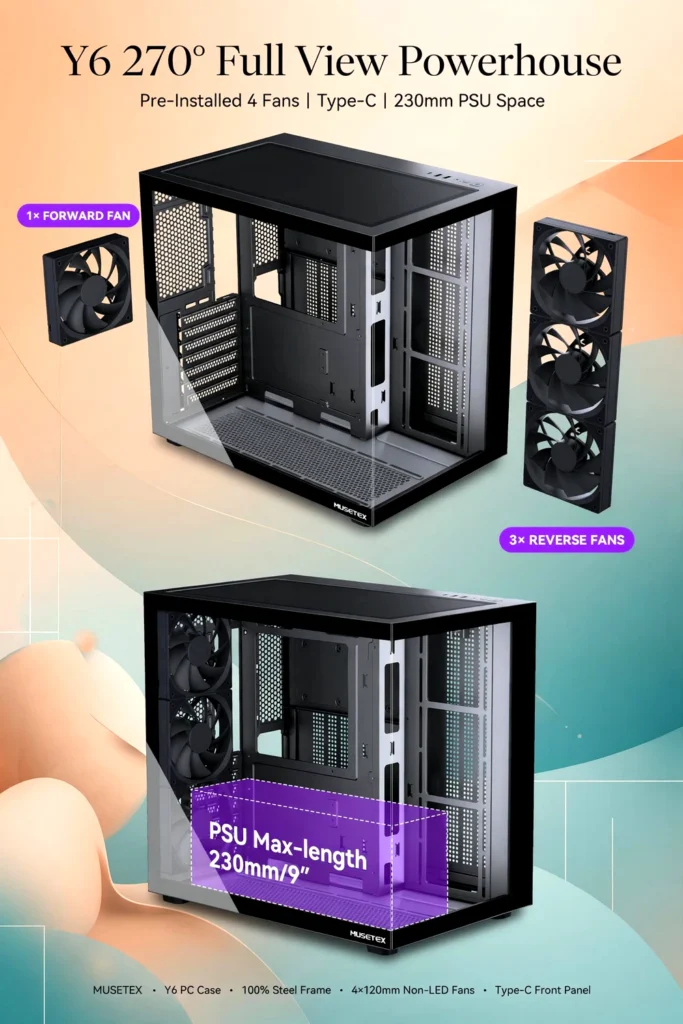
The tempered glass is an important design element, but the available specifications do not establish the thickness of the panels, frame rigidity, coating quality, or long-term durability. Those details are worth checking if the case will be moved frequently or used in a busy workspace.
Cable management also deserves attention. A showcase-style case benefits from neatly routed power cables, properly positioned fans, and a clean motherboard area. Before buying, check whether the Y6 provides adequate space behind the motherboard tray, dedicated cable-routing openings, and convenient tie-down points.
The same applies to routine maintenance. Removable panels, accessible fan mounts, and effective dust filtration can make cleaning easier, but these details should be verified rather than assumed.
Overall, the Y6’s design is appealing for builders who value a broad view of their components. Its practical build quality, however, should be judged by the construction details and owner feedback available for the exact model.
Practical Use & Performance
Gaming PC Builds
For a gaming system, the four included fans offer an initial ventilation setup. Whether that setup is sufficient depends on the GPU, CPU, fan arrangement, and games or workloads involved.
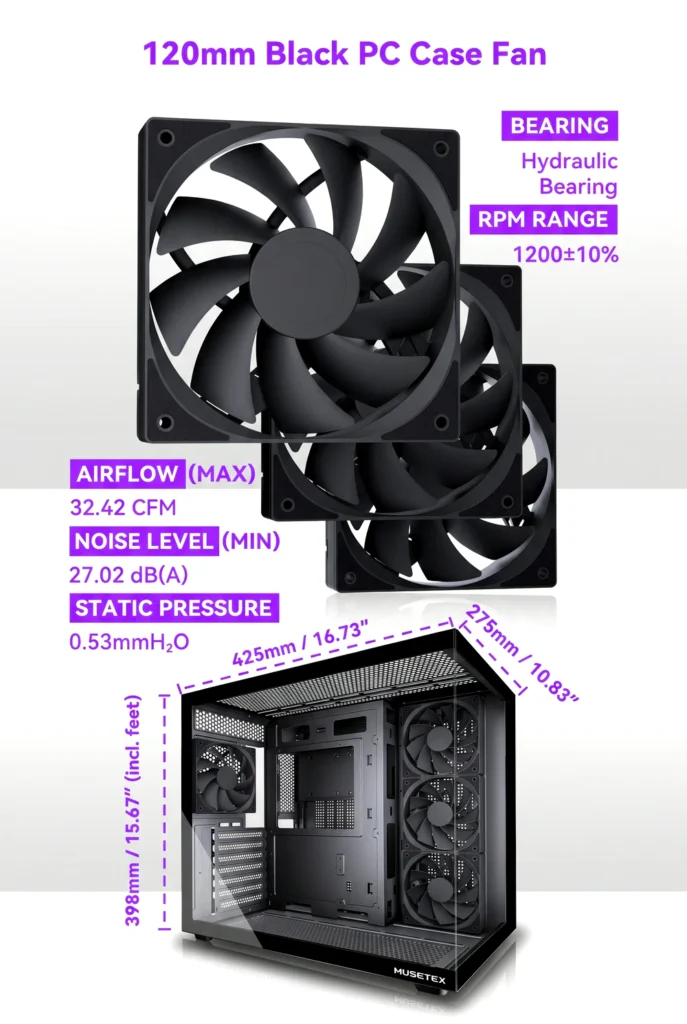
High-performance graphics cards can generate substantial heat, so buyers planning a powerful gaming rig should pay particular attention to intake and exhaust positioning. Additional fans may be useful if the supplied configuration does not meet the system’s cooling requirements.
Everyday Computing and Productivity
For web browsing, office applications, streaming, and general productivity, the Y6 may provide more visual appeal than a basic office-oriented chassis.
Its Type-C port can also be convenient for compatible accessories, provided the motherboard supports the required connection.
Custom and Showcase Builds
The panoramic glass layout makes the case worth considering for a build where component appearance matters. A coordinated black theme, tidy cable routing, and restrained lighting can complement the design.
Before planning a custom build, verify support for your chosen GPU, CPU cooler, motherboard, and any liquid-cooling equipment. A visually attractive case is only useful if the components fit comfortably.
Airflow and Thermal Expectations
The four included fans should be viewed as a starting point rather than a guarantee of low temperatures.

Actual thermal results depend on ventilation openings, fan orientation, component power consumption, ambient temperature, and the cooling hardware installed. Without independently verified testing of the MUSETEX Y6, it would be misleading to claim specific temperatures, noise levels, or cooling advantages.
Benefits & Potential Drawbacks
Potential Benefits

- Four included fans: Provides an initial cooling configuration without requiring an immediate purchase of four separate fans.
- Panoramic glass design: Makes the internal hardware more visible and supports showcase-oriented builds.
- Type-C connectivity: Offers convenient access to compatible modern peripherals.
- Black finish: Works with a wide range of component colors and build themes.
- Non-LED fans: Appeals to users who prefer a simpler appearance without built-in fan lighting.
Potential Drawbacks
- Compatibility details need checking: Exact GPU clearance, cooler height, motherboard support, and radiator fit should be confirmed before purchase.
- Cooling performance is unverified: Four fans do not necessarily guarantee strong airflow or quiet operation.
- Lighting may not suit everyone: Buyers who want an illuminated build may prefer cases with RGB fans or lighting controls.
- Glass requires care: Fingerprints, dust, and careful panel handling are considerations for showcase-style cases.
- Value depends on pricing: The included fans and Type-C port are useful, but their value depends on the overall price and the features offered by comparable cases.
Customer Feedback
Customer feedback for the exact MUSETEX Y6 variant could not be independently assessed for this review. Therefore, no verified customer rating, review count, or recurring owner-reported issue is presented.
Before purchasing, read recent reviews associated specifically with the Y6 and its four-fan, non-LED configuration. Pay particular attention to comments about panel fit, assembly instructions, fan noise, airflow, cable management, packaging, and the ease of installing larger components.
Give greater weight to detailed reviews that identify the hardware used and describe actual installation or long-term use. Confirm that feedback refers to the same model rather than another MUSETEX case with a similar appearance.
Pros & Cons
| Pros | Cons |
|---|---|
| Four pre-installed non-LED fans | Real-world cooling performance is unverified |
| 270° full-view tempered glass design | Glass panels require careful handling |
| Type-C connectivity | Port speed and motherboard-header requirements need confirmation |
| Black finish for a clean, understated build | RGB lighting is not included in the stated fan configuration |
| ATX mid-tower format | Exact component clearances and expansion options need verification |
Who Should Buy It / Who May Want to Skip It?
The MUSETEX Y6 May Suit You If:
- You want an ATX mid-tower case with a panoramic glass appearance.
- You prefer a black chassis with a relatively understated look.
- You want four fans included from the start.
- You need Type-C connectivity for compatible accessories.
- You are comfortable checking hardware clearances before assembling a PC.
You May Want to Skip It If:
- You specifically want pre-installed RGB fans and built-in lighting effects.
- You need confirmed support for an unusually large graphics card or radiator but cannot verify the required clearances.
- You prioritize independently measured thermal and acoustic performance.
- You need extensive storage capacity, particular front-panel ports, or specialized cooling support that the available specifications do not establish.
In those situations, compare detailed specifications and verified owner feedback before making a decision.
Final Verdict
The MUSETEX Y6 PC Case brings together three appealing features: a 270° full-view tempered glass design, four pre-installed non-LED fans, and Type-C connectivity. Its black finish also makes it a reasonable candidate for understated gaming PCs, everyday desktops, and showcase builds.
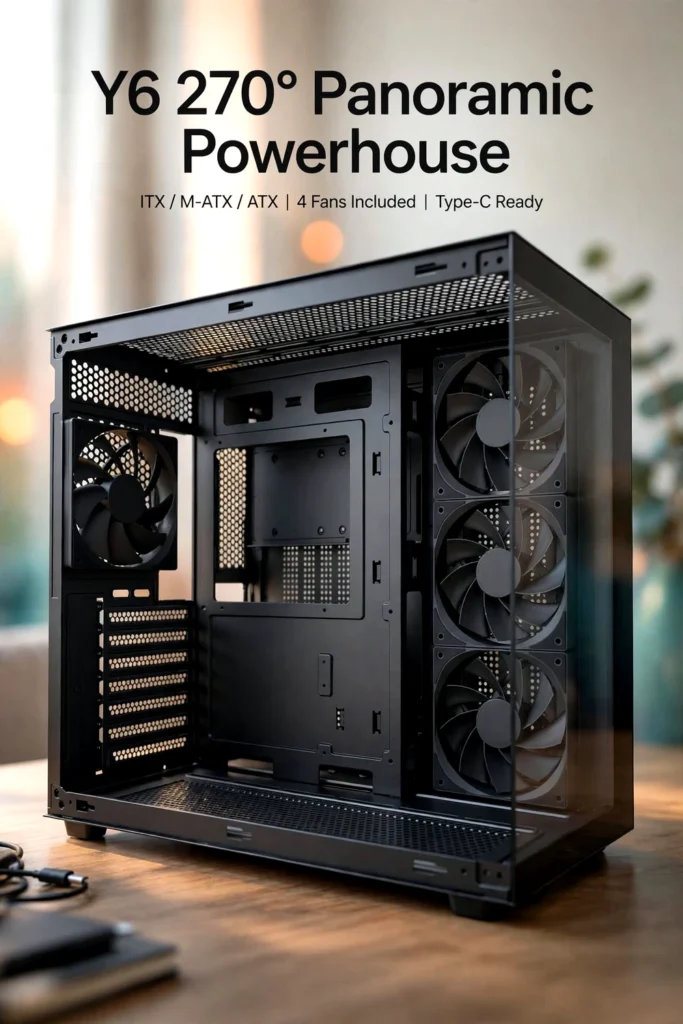
The biggest attraction is its combination of visible hardware and an included fan setup. For builders who do not need RGB lighting, that combination may be more practical than paying extra for illuminated fans they would prefer to replace.
Still, appearance and the number of included fans cannot establish overall build quality, thermal performance, or long-term value. The exact hardware compatibility, cooling layout, port specifications, and current price should determine whether this case makes sense for your particular build.
My recommendation: Keep the MUSETEX Y6 on your shortlist if panoramic glass and a clean black design are priorities. Before buying, confirm the fit of your components and review recent feedback for the exact variant.
Check the Latest Price and Availability
If the MUSETEX Y6 matches the look you want for your next PC build, take a moment to check the current price, availability, complete specifications, and recent customer reviews on the product page. Verify the supported hardware and cooling options before ordering so you can choose a case that fits both your components and your budget.



The author of RigRamp.com has been managing and developing the website since 2015, with a strong background in online marketing and affiliate programs across various marketplaces. With a passion for technology, the author enjoys exploring the latest tech products, discovering useful digital tools, and following trends in the online industry.
